Within the latest version of MacOS a feature called Reactions was added.
Reactions adds effects to the camera's video when certain gestures are performed.


More information is available on Apple's page https://support.apple.com/en-gb/HT212950
Turn off the Reactions feature
- Open your camera app: Start up any app that uses your camera, like Photo Booth, FaceTime, or during a Healios session.
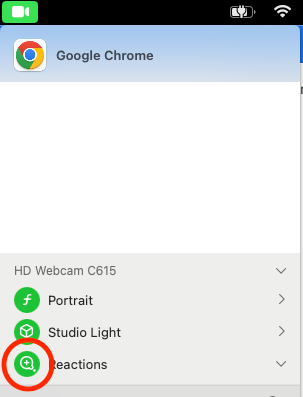
- Look for the green camera: At the very top of your screen, you'll see a menu bar. Find the icon that looks like a green camera and click it.
- Toggle Reactions: In the menu that pops up, you'll see the word "Reactions." Next to it is a little button. Click it to turn Reactions off (it'll change from green to grey) or back on again (green means they're active!).
Was this article helpful?
That’s Great!
Thank you for your feedback
Sorry! We couldn't be helpful
Thank you for your feedback
Feedback sent
We appreciate your effort and will try to fix the article